How Computer Simulations Influenced Modern Game Design
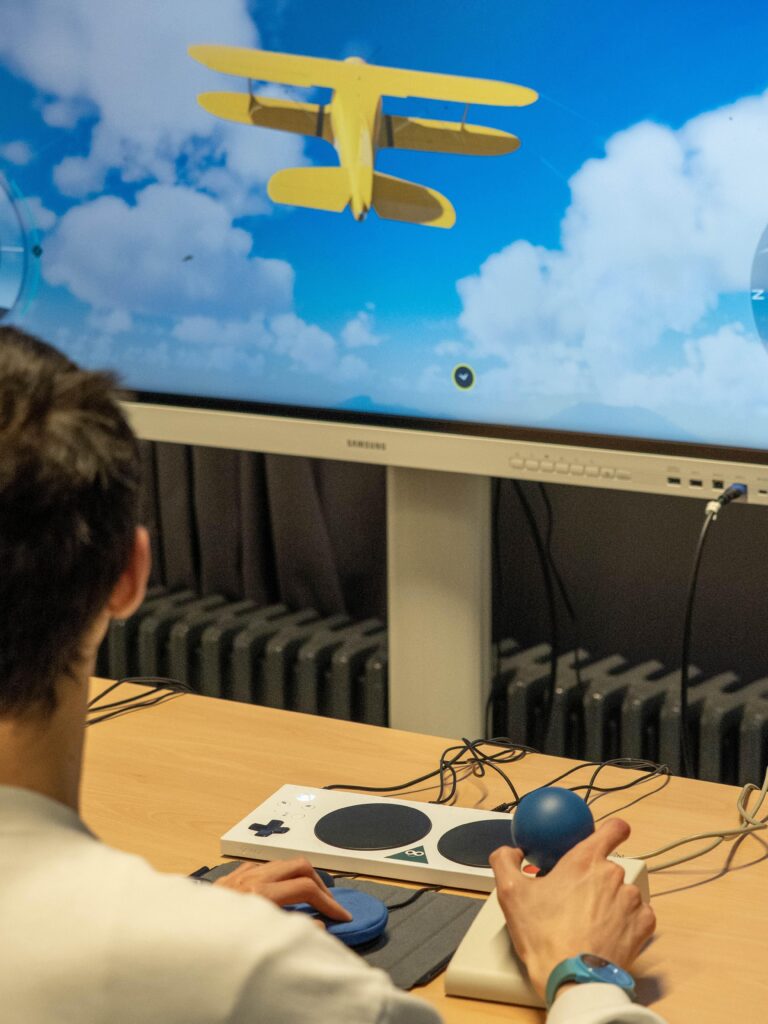

Modern game design often begins with an apparently simple question: what happens when the player does something? An answer may involve motion, changing resources, an artificial opponent or a narrative consequence. A computer simulation offers a useful way to organize some of these possibilities. It describes a set of rules and uses those rules to update a changing state. Designers can then decide which parts of that state a player should see, hear or control.
A model is a choice about what matters
A simulation cannot represent every detail of its subject. It must select variables that are meaningful for a particular purpose. Consider the representation of an aircraft in an entertainment program. The model could include a simplified relationship between controls and motion, an approximation of the surrounding environment or a detailed rendering of instruments. Each additional element has a cost in complexity and interpretation.
The history of flight simulation illustrates this deliberate selection. The Smithsonian’s historical account of pilot training describes early mechanical instrument-training equipment and later developments in aviation simulation. A training task and a game can require very different selections of detail. An entertainment designer might intentionally simplify something a professional instructor needs to represent accurately. This is a design decision, not evidence that the simplified program can provide operational training.
Rules establish a world the player can learn
A player forms expectations through interaction. If an action has a reasonably consistent consequence, the player can build an understanding of the system and use that understanding in later decisions. A game that changes important rules without communicating the change may leave the player confused, even when the underlying computation is working correctly.
Consistency does not mean that every outcome is predetermined in a way the player can predict. The system can incorporate uncertainty, environmental variation or the independent behavior of other entities. What matters is that the design gives the participant a useful way to understand the relationship between actions and outcomes.
The ability to learn those relationships is one reason simulation-like mechanics appear in many different genres. A driving game, for instance, might make the timing of a turn consequential. A resource-management game might make a decision in one part of the system affect another. The player is not merely choosing from a collection of pictures; they are interacting with relationships represented in software.
Feedback gives the rules a visible form
The result of a calculation is not necessarily meaningful to the person using a program. It has to be communicated through an interface. A change in a modeled quantity might be represented by a number, an animation, an audio cue or a change in the appearance of the environment. The designer chooses a representation that helps the player understand what happened and decide what to do next.
Flight simulation makes this problem especially visible because an instrument panel can contain a large amount of information. A professional setting may require specialized instruments, whereas a recreational game might show only a few indications related to the immediate objective. The amount of information should reflect the intended experience. Our article on human factors in aviation discusses the broader relationship between people, interfaces and workload in aviation; the application of that principle to a game is an editorial analogy, not an aviation safety recommendation.
Realism and playability are separate qualities
A realistic visual environment does not guarantee a compelling game. Similarly, a simple graphical world can contain rich interactions. Designers must decide whether the experience benefits from an accurate representation of motion, an exaggerated response, a predictable challenge or a more abstract treatment of its subject.
A useful way to think about the decision is to consider what the player is expected to notice. If the objective is to discover a relationship between two variables, a clear graphical representation may be more useful than a photorealistic environment. If the goal is exploration, details in a landscape may contribute to atmosphere and orientation. If the goal is a short challenge, rapid comprehension may matter more than fine-grained modeling.
These choices are often visible in the contrast between simulation-oriented entertainment and arcade-style games. One may invite extended experimentation, while the other emphasizes immediate interaction. Neither approach has to imitate the other to succeed.
Input design and accessibility
A control system is part of the experience. A physical joystick might be satisfying in a flight game, but it may not be available or usable for every person. Keyboard controls, remappable inputs, adjustable sensitivity and alternative ways to interact can help make a program usable by a broader audience. An interface should also communicate which controls are available and what they do.
Accessibility is not limited to the control hardware. Readable text, distinguishable visual indicators and alternatives to important audio-only cues can make information easier to interpret. A game that depends on a complicated interface should introduce its requirements clearly rather than assuming that every new participant has the same experience with its genre.
The role of computing and web graphics
Contemporary developers can draw on graphical APIs and engines that support two-dimensional and three-dimensional representations. MDN’s WebGL overview describes an API for rendering interactive graphics in compatible browsers. Its web game development techniques covers techniques relevant to developing games on the web. These tools can support the presentation of a simulated world, but they do not determine the rules of the game or the quality of its interface.
The distinction between rendering and behavior is important. A developer can improve the appearance of a scene without changing its underlying rules. Conversely, an adjustment to the model can change the experience without requiring new artwork. Thinking about these components separately makes it easier to identify why a design feels unclear or unresponsive.
Designing an experience rather than a replica
Simulation influenced game design through the idea that a set of relationships can become an environment for participation. It also demonstrates that an interface, a model and a purpose must work together. Recreational programs can borrow useful concepts from aviation simulation without trying to become training products.
The lasting value of this approach is the ability to create understandable, responsive worlds. Whether a game is visually realistic or abstract, its design should make the intended activity clear and allow the participant to engage with it on its own terms.
Testing the relationship between model and interface
A practical way to evaluate an interactive design is to watch what happens when someone encounters it for the first time. Does the participant understand what the program expects, or do they need an explanation that the interface itself does not provide? When an unexpected result occurs, can they tell whether it followed from their input, a changing condition within the model or a problem with the controls? These observations can help distinguish a poorly communicated rule from a poorly designed rule. A developer may find that a smaller visual change solves a problem more effectively than adding complexity to the underlying system. In another case, the interface may communicate perfectly but the modeled relationship itself may be unsuitable for the intended activity. This is one reason prototypes can be useful before detailed graphics are produced. A simple representation allows designers to investigate feedback, timing and comprehension while the model is still easy to modify. The finished experience can then add visual richness where it supports the activity, rather than expecting that richness to compensate for unclear interaction.
Featured photograph: InclusiveGameLab Person-Using-Adaptive-Controller 6 CC-BY-SA.jpg — InclusiveGameLab / Wikimedia Commons; CC BY-SA 4.0. Display may be resized or cropped.