From Flight Simulators to Interactive Digital Experiences
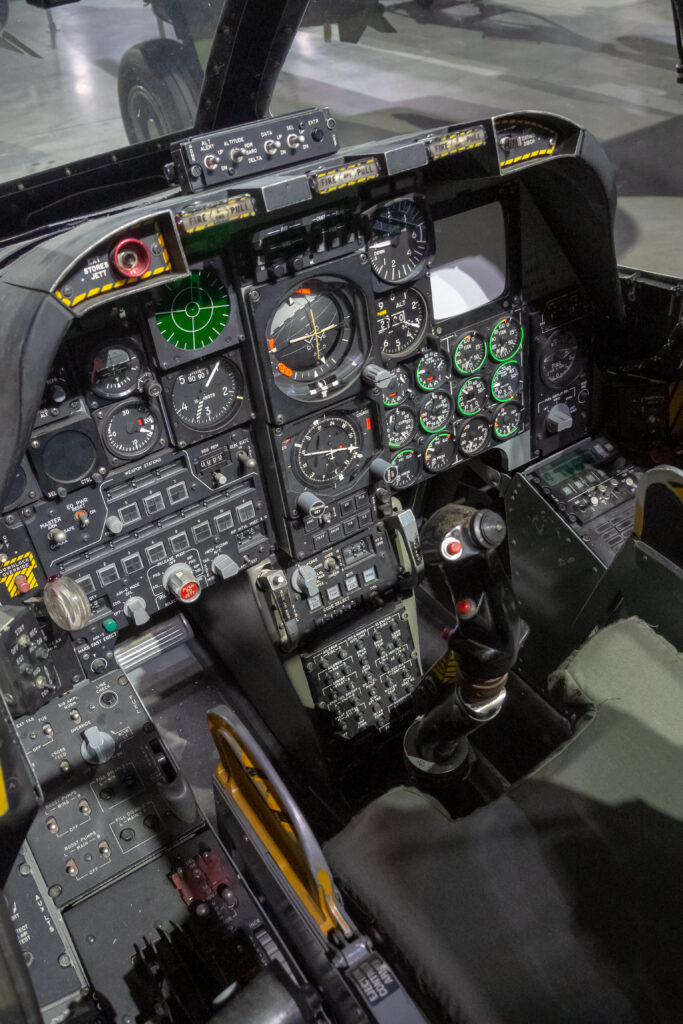

In 1929 an organ maker’s son from Binghamton, New York, built a strange contraption in his father’s factory. Ed Link had used the bellows and valves from player pianos to make a stubby wooden cockpit that tipped, rolled and pitched when you moved the controls. At first it sold as a fairground ride. Then the Army Air Corps lost a string of pilots flying the mail in bad weather, and someone realised Link’s “Blue Box” could teach instrument flying on the ground. By the end of the Second World War, Link Trainers had helped train hundreds of thousands of pilots.
That story is a good reminder that flight simulation has always lived on the edge between serious training and something people enjoy. Today the gap between the two looks narrower than ever. A home computer can show a photorealistic cockpit and a startlingly accurate view of almost any airport on earth. Professional simulators and consumer products now share many of the same ideas about screens and controls. But they are built for very different purposes, and held to very different standards.
A simulation is a set of choices
A simulation never copies everything. It models chosen parts of a system. That might be how an aircraft moves through the air, how its instruments respond, what the weather is doing or how the controls connect to the control surfaces. Engineers use models like these to test designs. Teachers use them to explain ideas. Training organisations use them to build and check skills.
Deciding what to include is a design decision. A tool built to teach someone how to read an attitude indicator doesn’t need the same physics as one used to evaluate how a new aircraft handles in a crosswind. Each one might be excellent at its job and useless at the other’s.
So “fidelity” only means something once you know the task. A basic display can be perfect for showing how pitch affects airspeed. That same display would be dangerously misleading if someone used it to judge real aircraft performance.
Qualification is not the same as looking real
The Federal Aviation Administration runs a National Simulator Program that evaluates devices used for regulated pilot training. At the top end are full flight simulators, rated in levels up to Level D. These sit on motion platforms, reproduce a specific aircraft type in great detail and can be approved for a large share of an airline pilot’s type training. The FAA publishes details on qualified flight simulation training devices, and the list is a long way from anything you can buy for a games console.
A convincing cockpit doesn’t make a device suitable for any particular training purpose. What counts is whether it has been evaluated, what program requirements apply and what task it’s meant to support. Somewhere in between sit aviation training devices, often desktop or tabletop setups used by flight schools. The FAA’s advisory circular AC 61-136B on aviation training devices explains how those devices are approved and what limited training credit they can carry.
None of that means a qualified device can stand in for every part of flying. Even the best simulator is still a simulator.
The loop at the heart of it
Every simulation runs on a feedback loop. You make an input. The model updates. The system shows you the result. You react. Round and round, many times a second.
Plenty of interactive digital experiences run on the same basic loop, from driving games to music apps. In each case, designers decide which information appears, which controls are on offer and what happens when you use them. Those decisions shape what the user ends up learning, whether the designers meant it or not.
In aviation, the stakes of getting that loop wrong are higher than in most fields. If a simulation responds in an unrealistic way, a learner can walk away with the wrong expectation. If that wrong expectation follows them into a real cockpit, the consequences can be serious. Timing, clarity and consistency all matter. A response that arrives half a second late, or an instrument that behaves slightly differently from the real thing, can quietly teach a bad habit.
Pretty is not the same as accurate
Visual detail is the first thing people notice, and the easiest to overrate. A simulator with gorgeous clouds and sunlight glinting on the wing can still get the underlying behaviour wrong. A plain, almost cartoonish display can teach a concept very well if it represents the right relationships.
Consumer flight simulators have come a remarkable distance. Microsoft Flight Simulator has roots going back to the early 1980s. Its recent versions stream satellite imagery and map data to recreate much of the planet, from your own street to remote airstrips. That’s genuinely impressive, and it has sparked real interest in flying for many people.
But feeling realistic and being validated for training are two different things. Hours spent in a home simulator don’t count toward a pilot’s licence on their own, and familiarity with a consumer product doesn’t prove competence in an actual aircraft. Realism in simulation covers more than visuals. It includes how the controls feel, how quickly the system responds, how instruments behave and how scenarios are designed.
Repeat, pause, rewind
One of simulation’s great strengths is repetition. In a real aircraft, an engine failure on takeoff happens once, if at all, and you’d rather it didn’t. In a simulator, an instructor can set up that exact situation again and again. They can change the wind, the weight or the time of day. They can stop the scenario halfway through and ask the student what they were thinking.
That ability to pause and reflect is where much of the learning happens. A student might have misread an instrument. They might have made a wrong assumption about how the system would respond. Or they might have understood everything correctly and simply reacted too slowly. Structured debriefing helps separate a misunderstanding of the interface from a misunderstanding of the underlying concept. Our piece on human performance and system design looks more closely at how these human factors shape safety.
Simulation also plays a role after accidents. When US Airways Flight 1549 landed in the Hudson River in 2009, investigators used simulator runs to test whether the aircraft could have made it back to an airport. Pilots who turned back immediately sometimes succeeded. Once a realistic delay for recognising the problem and making a decision was added, those attempts failed. It was a vivid example of how a well-designed scenario can reveal the gap between knowing what to do and having time to do it.
Even so, success in a scenario doesn’t automatically mean someone is ready for real operations. No simulator captures every condition a pilot might face.
Curiosity is a good start
None of this is meant to dismiss home simulators. They can introduce aviation vocabulary, spark an interest in how aircraft systems work and give students a reason to pick up a real textbook. Many working pilots will admit that a flight simulator on a family computer was where it all started for them.
Their educational value depends on how they’re used, and on how honestly their limits are explained. A desktop demonstration should never present itself as approved instruction when it isn’t. Historical simulations can be a great way to explore older aircraft and airspace, even if they don’t reproduce every detail. Publishers and teachers should say clearly what a tool is meant for and point readers to official sources for actual training requirements. The FAA’s overview of flight simulation systems is a useful starting point for understanding how simulation fits into aircraft development and certification.
Three questions for any simulator
When you’re looking at any interactive tool, whether it’s a game, a classroom demo or a professional training device, three questions cut through most of the marketing. What does the model represent? What does it leave out? And how does it tell you what’s happening when you act?
The answers will depend on the tool’s purpose. A simulator should be judged against a clear task, not against how beautiful it looks or how many aircraft it includes. Ed Link’s wooden box looked nothing like a real cockpit. It still taught a generation of pilots to trust their instruments, because it modelled the one thing that mattered for that job.
For more on how pilots build and keep a clear picture of what’s happening around them, see our article on situational awareness in aviation.
This article is educational background only. It is not a source of operational flight instruction. Always consult current official publications and qualified instructors.
Further reading
- FAA Flight Simulation Systems
- FAA National Simulator Program
- FAA AC 61-136B: Aviation Training Devices
- FAA: Qualified flight simulation training devices
Educational background only; not a source of operational flight instructions. Consult current official publications and qualified instructors.